Google Business Profile Optimization: A Checklist for Local Businesses
If you run a local business, your Google Business Profile probably gets seen more than your website does. It’s the panel that shows up when someone searches your name, and the listing that appears in the map when someone searches “near me.” People call straight from it, ask for directions from it, and judge you by its photos and reviews before they ever visit your site.
And yet most of the profiles we audit are half finished. Wrong hours. One blurry photo from 2019. A description that was clearly typed in a hurry. Reviews from two years ago with no replies.
This is the checklist we work through with our own clients. It’s based on what Google says matters, plus what we’ve seen move the needle for local businesses in Glendale and around Los Angeles.
How Google decides who shows up in the map
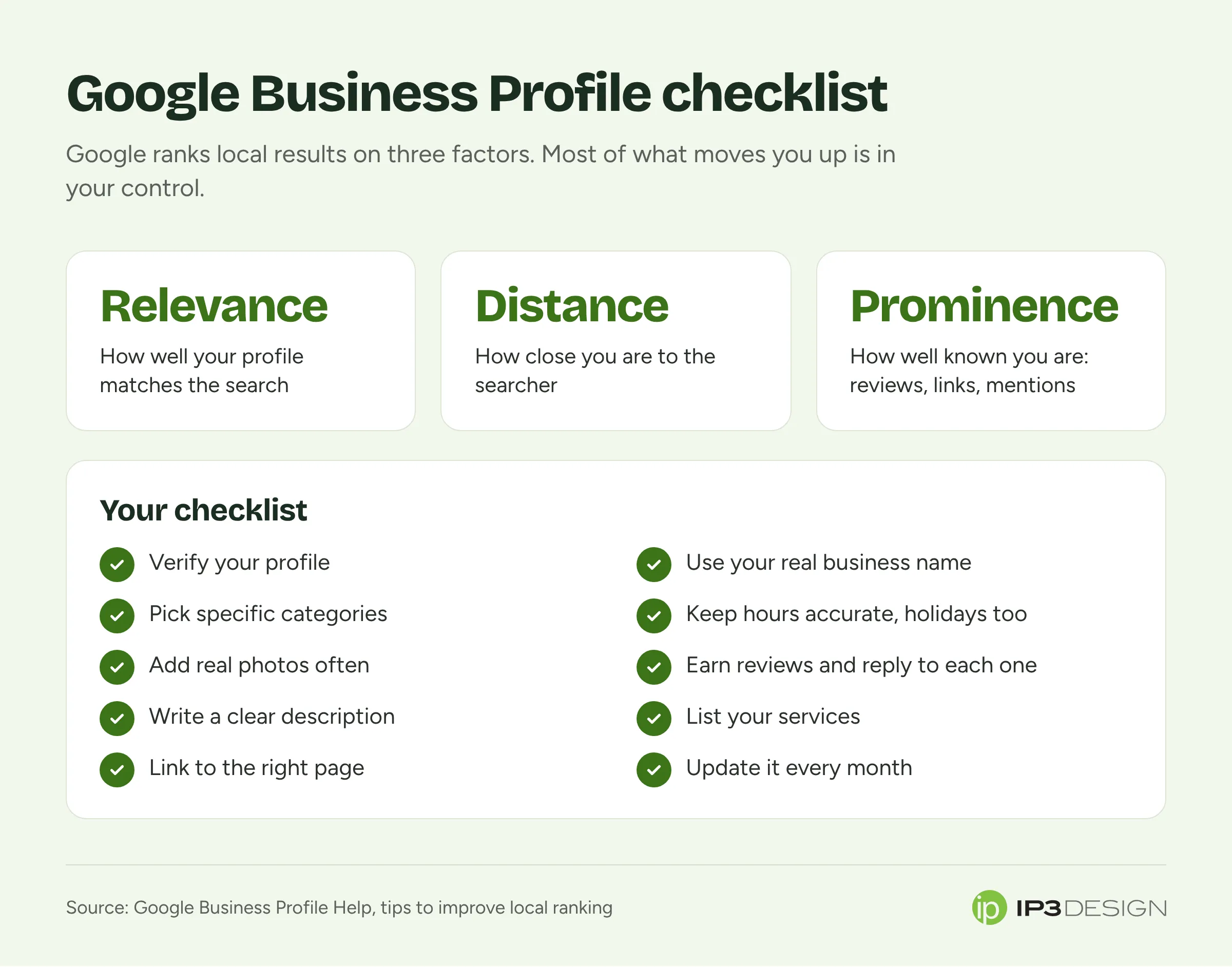
Before the checklist, it helps to know what you’re optimizing for. Google’s own page on improving your local ranking says local results are based mainly on three things:
- Relevance: how well your profile matches what someone searched for.
- Distance: how far your business is from the person searching, or from the location they searched for.
- Prominence: how well known your business is. Google mentions things like links to your website, articles about you, and how many reviews and ratings you have.
Google also says plainly that there’s no way to pay for a better local ranking. Ads can appear in the map, but the regular listings are earned.
You can’t do much about distance, short of moving. But relevance and prominence are mostly within your control, and that’s what this checklist covers.
The checklist
1. Claim and verify your profile
If you haven’t verified your profile, start here. Verification proves to Google that you’re authorized to represent the business, and an unverified profile is limited in what it can do and easier for someone else to edit.
Google offers several verification methods, and which ones you get depends on your business. It can take a little patience. Do it anyway.
While you’re at it, check who has access. We regularly find profiles managed from a former employee’s personal Gmail account, or by a marketing company the business stopped working with years ago. You want at least two people from your own business listed as owners or managers, using accounts you control.
2. Use your real business name, and nothing else
This is the most common mistake we see, and it can get a profile suspended. Google’s guidelines for representing your business say your name should match your real-world name, the one on your signage, website and stationery. Adding unnecessary information isn’t allowed.
So no “Joe’s Plumbing - Best Emergency Plumber Glendale CA 24/7.” Just “Joe’s Plumbing.” Google’s guidelines specifically rule out taglines, phone numbers, hours, URLs, and location details that aren’t part of your actual name.
We know it’s tempting. You’ve probably seen competitors stuffing keywords into their names and ranking well. Some of them will get away with it for a while. Others will wake up one morning to a suspended profile and no calls, and getting reinstated can take weeks. It’s not worth the risk, and competitors who do it can be reported.
3. Choose the right categories
Your primary category is one of the strongest relevance signals you have. Pick the one that most specifically describes your core business. “Pediatric dentist” beats “dentist” if that’s what you are. “Mexican restaurant” beats “restaurant.”
Then add secondary categories for other things you genuinely do, but don’t pile them on. Each one should be something a customer could reasonably walk in and get.
If you’re not sure which category to use, search for your main service in your area and look at what categories the top-ranking businesses use. It’s a decent starting point.
4. Get your address right, or hide it
If customers come to you, list your full address exactly as it appears in the real world and keep it consistent everywhere else it appears online.
If you go to customers instead, like a plumber, house cleaner or mobile mechanic, Google’s guidelines say service-area businesses should hide their address and set a service area instead. Running the business from home doesn’t mean your home address should be on the map. If you have a staffed shopfront that customers can visit during your listed hours and you also travel to customers, you can show the address and set a service area too.
Don’t list a virtual office or a mailbox you don’t actually staff. That’s against the guidelines and is a common reason for suspension.
5. Keep your hours accurate, especially on holidays
Nothing loses a customer faster than showing up to a locked door because Google said you were open. Set your regular hours, and use special hours for holidays, vacations and anything unusual. Google’s ranking tips mention hours specifically.
We’d put a reminder in your calendar a couple of weeks before every major holiday to update them. It takes two minutes.
6. Write a description that says what you actually do
Your description is a chance to tell customers who you are in your own words. Skip the fluff (“We are committed to excellence…”) and get specific. What do you do? Who for? What makes you different? How long have you been doing it? Which neighborhoods do you serve?
Write it for a person deciding whether to call you, and naturally mention your main services and area. Don’t stuff it with keywords or links, and don’t use it for promotions that will go out of date.
7. Add real photos, and keep adding them
Google’s tips say photos help show customers what you offer, and in our experience profiles with plenty of good, recent photos get more engagement. Upload:
- The outside of your building, so people recognize it when they arrive
- The inside, so they know what to expect
- Your team, which builds trust faster than anything
- Your work: finished projects, products, dishes, before-and-afters
- Short videos if you have them
Use real photos you’ve taken. Stock images make you look like you’re hiding something. Phone photos are fine if they’re well lit and in focus.
Customers can also add photos to your profile. Keep an eye on those, because now and then something unflattering or irrelevant gets added. You can report photos that break Google’s policies.
8. List your services and products
Your profile lets you list the services you offer, and in many categories, products too. Fill these in thoroughly with short, plain descriptions. It’s another way to show Google exactly what you do and helps your profile match more specific searches.
9. Build a steady stream of real reviews
Reviews do double duty. Google lists review count and ratings as part of prominence, and customers rely heavily on them to choose.
A few things we’ve learned:
- Ask every happy customer. Most people are glad to leave a review; they just don’t think to. Google lets you create a short link that opens the review form directly. Put it in your follow-up emails, on your receipts and on a card at the counter.
- Ask soon. The best time is right after a job well done, while the experience is fresh.
- Never buy reviews or offer incentives for them. It’s against Google’s policies, and fake reviews can be removed in bulk, sometimes taking your rating down with them.
- Don’t panic about a bad review. Every real business has a few. A handful of critical reviews among lots of good ones actually makes your rating more believable.
10. Reply to every review
Google’s ranking tips specifically mention responding to reviews. More importantly, future customers read your replies.
For good reviews, a short, genuine thank-you is plenty. Mention something specific if you can, so it doesn’t read like a template.
For bad reviews, stay calm. Thank them for the feedback, apologize if something went wrong, and offer to sort it out offline with a phone number or email. Don’t argue, don’t share private details, and don’t reply when you’re angry. You’re writing for the next hundred people who read it, not just the reviewer.
11. Link to the right page on your website
Your profile links to your website, and that click should land somewhere useful. For a single-location business, the homepage is usually fine. If you have multiple locations, link each profile to its own location page.
Make sure that page loads quickly on a phone and makes calling or booking easy. A great profile that sends people to a slow, confusing website wastes the hardest part of the work.
12. Post updates now and then
You can publish posts on your profile with news, offers, events and updates. They won’t transform your rankings, but they show customers the business is active, and they give you a place to highlight what’s new. Once or twice a month is plenty for most businesses.
Keep your details consistent everywhere
Your business name, address and phone number appear in lots of places beyond Google: Apple Maps, Bing, Yelp, Facebook, industry directories, your chamber of commerce. When they don’t match, it creates confusion for customers and for the systems that try to figure out which listings belong to which business.
Make a list of where you’re listed and work through it. Pay special attention after a move or a phone number change, when old listings tend to linger for years.
Why this matters more with AI search
Google now answers many searches with AI-generated summaries, and for local questions those answers draw heavily on Business Profile information. If someone asks, “Is there a bakery near me that does gluten-free birthday cakes and is open Sunday?”, the answer depends on whether your hours, services and description actually say so. We’ve written more about how Google’s AI search is changing SEO if you want the bigger picture.
Mistakes that get profiles suspended
To save you some grief, here are the issues we see behind most suspensions:
- Keywords or locations stuffed into the business name
- A virtual office, coworking desk or mailbox listed as the address
- Service-area businesses showing a home address
- Multiple profiles for the same business at the same location
- Sudden big changes to the name, address and category all at once
If your profile does get suspended, don’t create a new one. Fix whatever broke the rules and request reinstatement through Google’s process. Creating duplicates usually makes things worse.
How long until you see results?
Some changes show up quickly. Fixing your hours, categories and photos can improve how often you appear within weeks. Prominence takes longer, because reviews and reputation build over months.
The businesses that do best treat their profile like a storefront window rather than a one-time setup task: check it monthly, keep it current, keep the reviews coming.
A 15-minute monthly routine
Once your profile is in good shape, keeping it there takes very little time. Put this on the calendar for the first Monday of each month:
- Check your hours and add special hours for any holidays coming up.
- Reply to new reviews you haven’t answered yet.
- Add three or four new photos of recent work, your team or your space.
- Look over customer-added photos and report anything that breaks the rules.
- Scan for suggested edits. Anyone can suggest changes to your profile, and Google sometimes applies them. Make sure your name, hours and phone number haven’t been changed without you noticing.
- Glance at your performance numbers: calls, direction requests and website clicks. Big drops are worth investigating.
- Post one update if you have something worth sharing.
That’s it. Fifteen minutes a month keeps your profile accurate and active, and it’s one of the best-value marketing habits a local business can have.
Need a hand?
Local search is where most service businesses win or lose customers, and it’s where we spend a lot of our time. Our local SEO service covers everything on this list, plus listing cleanup and reporting so you can see the calls and direction requests coming in. If you’d like us to take a look at your profile, send us a message and we’ll tell you what we’d fix first.