How to Get More Google Reviews Without Breaking the Rules

You do good work. Your regulars tell you so. But when someone new searches for a business like yours, they see a competitor with 300 reviews and you with 23, the most recent from last spring. It doesn’t feel fair, and it costs you calls.
Most businesses in that spot don’t have a quality problem. They have an asking problem. Happy customers rarely leave a review on their own, while unhappy ones often do. The fix is a steady, simple habit of asking, done in a way that stays inside both Google’s rules and federal law.
That last part matters more than it used to. Google treats paid or rewarded reviews as fake engagement, and the Federal Trade Commission has a rule on fake reviews and testimonials that took effect on October 21, 2024. Plenty of “review hacks” that small businesses picked up over the years now carry real risk.
Why reviews matter so much for a local business
Reviews do two jobs at once.
First, they help you show up. Google says local results are based on relevance, distance and prominence, and it lists review count and ratings as part of prominence. We covered the full picture in our Google Business Profile checklist, but the short version is that a business with a steady flow of reviews looks more established to Google.
Second, they help people choose. Someone comparing three plumbers in Burbank on their phone will read a few reviews, glance at the dates, and call the one that feels trustworthy. Recent reviews tell them you’re still open and still doing good work. Your replies tell them how you treat people when something goes wrong.
The goal isn’t a huge number. It’s a steady stream of recent, honest reviews.
What Google allows, and what it doesn’t
Google’s rule is short: reviews and other contributions to Google Maps must reflect a genuine experience. Everything else follows from that.
Allowed
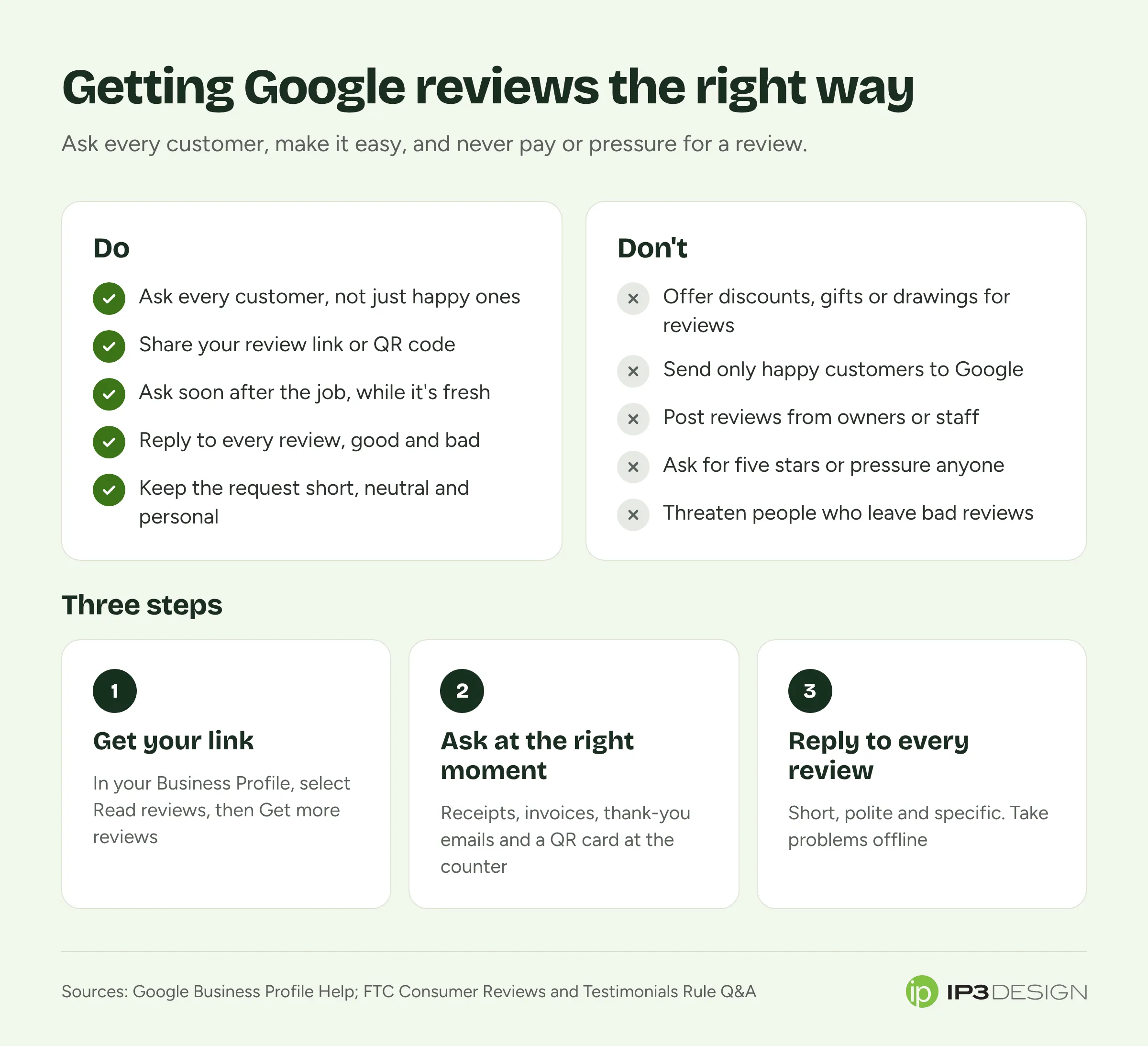
- Asking customers for a review. Google actively encourages it. Its tips to get more reviews suggest reminding customers to leave one, sharing a link or a QR code, and replying to reviews so people can see their feedback matters.
- Sharing your review link anywhere. Google’s help pages mention receipts, thank-you emails, the end of a chat conversation, and a printed QR code displayed in your store. You can also send requests by email, a messaging app or a social post.
- Replying to every kind of review. Google recommends replying and sharing your perspective, good reviews and bad.
Not allowed
- Incentives. Google says offering free or discounted goods or services in exchange for customers posting reviews, changing reviews or removing negative reviews “is considered fake engagement and is strictly prohibited.” That includes the classic “10% off your next visit for a review” card.
- Pressure. Google’s policy on rating manipulation names coercing or pressuring customers for specific ratings or reviews, soliciting fake reviews, and coordinated campaigns to inflate or deflate a rating.
- Reviews that aren’t from a real experience. Reviews you write yourself, reviews from people who never visited, and reviews bought from a service all fall under fake engagement.
- Conflicts of interest. Google’s policy on incentivized and biased reviews also covers reviews influenced by a personal or professional conflict of interest. Think owners, staff, or a competitor going after you.
Notice that Google’s line on incentives is stricter than the FTC’s, which we’ll get to next. For Google reviews, the simple rule is: no rewards of any kind for reviews, no matter how they’re worded.
What the FTC rule means for you
The FTC announced its final rule on consumer reviews and testimonials on August 14, 2024, and it went into effect that October. It’s aimed at deceptive practices, not at normal businesses asking customers for feedback. The FTC’s questions and answers on the rule are worth a skim, but here’s what matters for a small business.
Fake reviews. The rule prohibits creating or selling fake reviews, and buying them or posting them when the business knew or should have known they were fake. That includes reviews written with AI that don’t reflect a real customer’s experience.
Paying for a particular opinion. It prohibits offering compensation or other incentives conditioned on a review expressing a particular sentiment, positive or negative. The condition doesn’t have to be spelled out; an implied one counts. The FTC’s own example of a violation reads like something you’ve probably seen on a table tent: “Tell us how much you loved your visit to John’s Steakhouse and get a $5 coupon.”
Insider reviews. Reviews by your officers or managers that don’t clearly disclose the connection are prohibited, and there are added requirements when owners or managers ask employees or relatives to post reviews. If you own a small business and want family members to write reviews, the FTC’s answer is that you can, but you should ask them to clearly and conspicuously disclose their relationship to your business. (On Google, a review from your sister is still a conflict of interest, so we’d skip it there entirely.)
Review suppression. The rule prohibits using unfounded legal threats, physical threats, intimidation or certain false public accusations to prevent or remove a negative review. It also prohibits claiming the reviews on your site are all or most of what you received when you’ve suppressed some based on rating or sentiment.
Fake social proof. It covers buying fake followers or views generated by bots or hijacked accounts, when used for a commercial purpose.
The rule allows the FTC to seek civil penalties against knowing violators. In plain terms, the shortcuts that used to be “against the rules” on review sites can now also be against the law.
What about only asking happy customers?
This one is called review gating: you send a quick “How did we do?” survey, and only people who answer with a high score get the link to post a public review. Unhappy customers get routed to a private feedback form instead.
The FTC’s Q&A addresses it directly. The rule doesn’t contain a specific prohibition, but the FTC says the practice “could violate the FTC Act.” Google’s own tips also say a mix of positive and negative feedback often feels more trustworthy to customers.
Our recommendation is simple: ask everyone. It’s the safest approach, and it’s better for you anyway. A 4.7 with a few honest complaints and thoughtful replies reads as real. A wall of perfect scores makes people suspicious.
How to get your review link or QR code
Google gives every verified business a direct link that opens the review form. Using it removes most of the friction, since customers don’t have to search for you and hunt for the right button.
Google’s steps:
- Go to your Business Profile at business.google.com.
- Select Read reviews, then Get more reviews.
- Copy the link, or save the QR code image to print.
At the time of writing, Google says review QR codes can only be generated from a computer browser, not a phone, so do this one at your desk.
One thing to know before you start sending the link: customers need to be signed in to a Google Account to leave a review. Google notes they can create one with a non-Gmail email address, which is useful if a customer tells you they “don’t have Google.”
When and how to ask
The best time to ask is right after a customer tells you they’re happy. The second-best time is within a day or two of the job, while it’s fresh. After that, the odds drop.
Here’s how that looks for a few kinds of business:
- A dental office in Glendale might send a short email or text the afternoon of the visit, with the review link and a one-line thank-you from the front desk.
- A contractor in Pasadena might ask in person at the final walkthrough, then follow up with the link in the invoice email.
- A café on Brand Boulevard might put a small QR code card by the register and on receipts, and have staff mention it when a regular compliments the food.
What to say
Keep it short, personal and neutral. You’re asking for their honest experience, not for five stars. Something like:
Thanks for choosing us today. If you have a minute, we’d really appreciate an honest review on Google. It helps other people in the neighborhood find us. Here’s the link: [your link]
A few things that help:
- Make it easy. One tap to the review form. Don’t send people to your website first, and don’t ask them to search for you.
- Ask once, maybe remind once. A single friendly follow-up is fine. Three reminders is pestering, and it starts to feel like pressure.
- Ask everyone. Build the request into your normal process (the receipt email, the invoice, the end-of-job checklist) so it goes to every customer automatically. That’s both fair and easier to maintain.
- Give staff permission to ask. Your team hears the compliments. A simple “Would you mind sharing that on Google?” is often the most effective ask of all.
What not to say
- “Leave us a 5-star review!” (asks for a specific rating)
- “Review us and get 10% off” (an incentive, which Google prohibits)
- “If you’re happy, review us on Google. If not, email us first.” (a soft version of gating)
- “Enter our drawing when you leave a review” (still an incentive)
If you send a regular newsletter or customer emails, a review request fits naturally into a post-purchase or post-appointment message. Our email marketing team sets these up so they go out automatically after each job.
Replying to reviews, including the bad ones
Replies are part of how you get more reviews. People who see that a business actually reads and answers feedback are more likely to leave their own.
Google’s guidance on replies is sensible:
- Keep replies clear, helpful and polite.
- Keep them short. Long replies can overwhelm people.
- Be a friend, not a salesperson. There’s no need to stuff in deals or promotions.
- Sign with your name or initials, and respond in a timely way.
For a positive review, a short thank-you that mentions something specific is plenty. “Thanks, Maria. Glad the new water heater is keeping up with the cold mornings” beats a copy-pasted “Thank you for your business!”
For a negative review, Google suggests checking your records about the reviewer and their visit, showing empathy, admitting mistakes that were made (without taking responsibility for things outside your control), and inviting them to contact you by phone, email or in person to sort it out. Never share the reviewer’s private information, and don’t attack them.
One more thing: Google reviews your replies before they’re posted. It says this usually takes up to 10 minutes but can take up to 30 days, so don’t worry if a reply doesn’t appear right away.
What you can’t do about a bad review
You can flag a review if you believe it breaks Google’s content policies, for example a fake review that doesn’t reflect a genuine experience. You can’t get a review removed just because it’s negative or because you disagree with it.
And under the FTC rule, threatening a customer with legal action or intimidating them to get a negative review taken down isn’t just bad manners. It can be a violation. If a review is unfair, a calm, factual reply is your best tool. The next customer reading it will notice how you handled it.
A simple monthly routine
Reviews work best as a habit, not a campaign. Here’s a routine that takes very little time once it’s set up:
- Make sure every customer gets the ask. Check that your link is in your receipt or follow-up emails, your invoices and on a card or sign at the counter.
- Reply to every new review. Set aside ten minutes a week, or turn on notifications so you see new ones as they arrive.
- Read the negative ones for patterns. If three people this month mentioned long wait times, that’s useful information, and fixing it helps more than any reply.
- Thank your staff. When a review mentions someone by name, share it with the team. It encourages the habit of asking.
- Check your profile while you’re there. Hours, photos and services drift out of date. A quick look each month keeps everything accurate.
Common questions about Google reviews
Can I offer a discount or entry into a giveaway for leaving a review?
Not for Google reviews. Google prohibits incentives in exchange for posting, changing or removing reviews, and it considers it fake engagement. The FTC rule is narrower and focuses on incentives tied to a particular sentiment, but since Google’s policy is stricter, it’s the one that applies to your Google profile.
Can my employees or family leave reviews?
On Google, we’d say no. Reviews influenced by a personal or professional conflict of interest are against Google’s policies. The FTC also has specific rules for insider reviews by officers and managers, and expects family members to disclose their relationship if they do review your business somewhere.
Is it OK to send a survey first and only ask happy customers for a Google review?
We don’t recommend it. The FTC says review gating isn’t specifically banned by its rule but “could violate the FTC Act,” and a mix of reviews looks more trustworthy anyway. Ask everyone.
Should I use a service that promises to get me lots of reviews fast?
Be careful. Software that helps you send your review link to every customer is fine. Any service that writes reviews, posts them from its own accounts, or only sends your link to customers who rated you highly puts your profile and your business at risk.
How many reviews do I need?
There’s no magic number. What helps most is a steady flow of recent reviews and thoughtful replies. A business that gets a few honest reviews every month will usually look more trustworthy than one that got 50 in a single week two years ago.
Need help building the habit?
Getting more reviews is mostly about making the ask part of how you already work, and making sure your Google Business Profile is set up to turn those reviews into calls. That’s a big part of what our local SEO work covers: setting up your profile, building the review request into your follow-ups, and keeping everything accurate month to month.
If you’d like a hand, get in touch with our team. We’re in Glendale, we’ve been doing this since 1995, and we’re happy to take a look at your profile and tell you where we’d start.