Title Tags and Meta Descriptions That Earn the Click
Picture a homeowner in Burbank with a leaking water heater. They type “water heater repair burbank” into Google and get a page of results. They don’t open ten tabs. They glance at a handful of blue headlines and two-line descriptions, pick the one that sounds most like what they need, and tap it. That glance takes a couple of seconds, and it’s the whole sale.
Those headlines and descriptions mostly come from two small pieces of code on your pages: the title tag and the meta description. Nobody sees them on your website itself, which is exactly why they get neglected. It’s common to find small business sites where every page is titled “Home” or the company name, or where the description is a leftover line from whoever built the site years ago.
The good news is that these are some of the easiest fixes in SEO. This guide covers what Google actually says about both, what we recommend, and a simple way to fix your most important pages this week.
What title tags and meta descriptions are
Every web page has a section of code called the head that visitors don’t see. Two lines in it matter here.
The title tag looks like this:
<title>Water Heater Repair in Burbank | Example Plumbing</title>It’s the text that shows in your browser tab, and it’s the main thing Google uses to build the clickable headline of your search result. Google calls that headline a “title link.”
The meta description looks like this:
<meta name="description" content="Same-day water heater repair and replacement in Burbank. Licensed plumbers, upfront pricing, and we'll call you back within the hour.">It’s a short summary of the page. Google sometimes shows it as the gray text under your headline, which Google calls the snippet.
Most website platforms (WordPress, Shopify, Squarespace and the rest) give you a field for each one, often under “SEO settings” for a page. You rarely need to touch code to change them.
Google decides what shows, but your tags still matter
Here’s the part that surprises people: Google doesn’t promise to use either one word for word.
For titles, Google says its generation of title links “is completely automated” and that it pulls from a number of sources. According to Google’s guide to influencing your title links in search results, those sources include:
- The text in your
<title>element - The main visual title shown on the page
- Heading elements, such as your
<h1> - The
og:titletag used for social sharing - Other large, prominent text on the page
- Other text on the page and anchor text on the page
- The text of links pointing to the page from elsewhere
- WebSite structured data
Your title tag is first on that list, and when it’s accurate and clear, it’s usually what people see. When it’s missing, vague or misleading, Google looks for something better and may show that instead.
Descriptions work similarly, with an important twist. Google says snippets are “primarily created from the page content itself,” and that it will sometimes use your meta description “if we think it gives users a more accurate description than would be possible purely from the on-page content.” That means Google may show different snippets for different searches, pulling a sentence from your page that better matches what the person typed.
So why bother? A clear, accurate title is the one Google is most likely to keep, and a good description gives Google a better option than a random sentence from your footer. You’re making the right answer the easy one to pick.
How to write a title tag that gets clicked
Describe the page, plainly
Google’s first piece of advice is simple: make sure every page has a title, and write “descriptive and concise text” for it. Google specifically says to avoid vague titles like “Home” for your home page or “Profile” for a person’s profile page.
The test we use: if someone saw only your title, with nothing else, would they know what the page offers and where? “Services” fails. “Kitchen Remodeling in Pasadena | Example Builders” passes.
Put the important words first
Google says there’s no limit on how long a title element can be, but the title link is “truncated in Google Search results as needed, typically to fit the device width.” On a phone, that can cut off sooner than you’d expect. Google doesn’t publish a fixed character count, so don’t build your titles around one.
The practical answer is to lead with what matters most. Start with the service and the place, then the business name. If the end gets cut off, the searcher still sees “Emergency Dentist in Glendale” rather than “Welcome to the Official Website of Smith Family…”
Don’t stuff keywords
A few descriptive words help. Repeating them doesn’t. Google’s own example of what not to do is a title like “Foobar, foo bar, foobars, foo bars,” and it warns that this kind of repetition can make your results look spammy to Google and to users.
For a local business, the local version of this is a title like “Plumber Glendale, Glendale Plumber, Best Plumbing Glendale CA.” It reads like a list, not a business, and it gives the searcher no reason to choose you. Pick the one phrasing a real customer would use and write a clean title around it.
Give every page its own title
If every page on your site shares the same title, Google notes, users can’t tell two pages apart. Its example is a store that titles every page “Cheap products for sale.” Google also flags long titles that change by only one small detail as “boilerplate” titles and suggests updating each title to reflect what’s actually on that page.
This matters most on sites with many similar pages, like product pages or a page per practice area or treatment. Each one needs a title naming exactly what it covers.
Brand it, briefly
Google’s advice is to “brand your titles concisely.” Your home page is a reasonable place to add a little more about who you are. On other pages, Google suggests putting your site name at the beginning or end, separated by a hyphen, colon or pipe. We usually put it at the end, so the service comes first. Keep the brand portion short, since it’s the part searchers need least.
Keep it honest and current
Google lists the common reasons it rewrites a title. They’re worth checking against your own site:
- Half-empty titles. Part of the title is missing, like a product page titled only “| Site Name.”
- Obsolete titles. The title still says last year while the page has been updated. Google’s example is a university page whose title says 2020 while its heading says 2021.
- Inaccurate titles. The title doesn’t match what the page is about.
- Micro-boilerplate. A group of pages shares the same title, like every season page for a TV show using the show name alone.
- No clear main title. The page has several big headings and none of them is obviously the main one, so Google may use the first heading.
- Language mismatch. The title is in a different language or writing system than the page.
That last one matters around Los Angeles, where plenty of businesses have pages in Spanish, Armenian, Korean or other languages. Google says to use the same language and writing system as the main content of the page. A Spanish page should have a Spanish title, not the English one copied over.
If Google is showing a different headline than the one you wrote, check for these issues first. If none apply, Google suggests asking whether its version is a better fit for what people search. Sometimes it is, and that’s useful feedback.
How to write a meta description that earns the click
In its guide to writing meta descriptions, Google describes a good one as “like a pitch that convince the user that the page is exactly what they’re looking for.” That’s the right way to think about it. Your title says what the page is. Your description says why this result, out of the ten on the screen, is the one to tap.
Summarize this specific page
Google’s examples are blunt. A description that tells a nostalgic story about picking eggs from a hen house doesn’t summarize a guide to cooking eggs. A better version says what the page covers: the methods, the time it takes. The same goes for your service pages. Say what the page offers, who it’s for and what the reader can do next.
Include the details people care about
Google points out that a description doesn’t have to be a sentence; it’s also a place to pull together key facts scattered across the page. Its “better” example for a sewing shop mentions opening hours and location: “Open Monday-Friday 8-5pm, located in the Fashion District.” Its weak example is just a list of products.
For a local business, those details are often what wins the click: the neighborhood you serve, your hours, whether you offer same-day appointments, free estimates or weekend service. Only include what’s true and current. A description promising Saturday hours you dropped last spring will cost you more trust than it earns.
Don’t write a keyword list
Google says descriptions made of long strings of keywords “don’t give users a clear idea of the page’s content” and are less likely to be shown. Its “bad” examples include a sewing shop description listing “Sewing supplies, yarn, colored pencils, sewing machines…” and a single two-word description, “Mechanical pencil.” One is too stuffed, the other too thin. The better version of the pencil description names specific features and an offer.
Write unique descriptions, starting with your key pages
Google says identical or similar descriptions on every page aren’t helpful. It suggests using a site-level description on your home page and page-level descriptions everywhere else. If you don’t have time to write one for every page, Google’s advice is to prioritize: at the very least, cover critical pages like your home page and your most popular pages.
For a store with hundreds of products, hand-writing every description may not be realistic. Google says generating descriptions automatically from page data is appropriate for large sites, as long as the results are “human-readable and diverse.” In practice, that means a template that pulls in each product’s name, key features and price, not one sentence repeated with a single word swapped.
Length
Google says there’s no length limit, but snippets are trimmed to fit the device. Put the most important point in the first sentence and keep it to one or two.
A side-by-side example
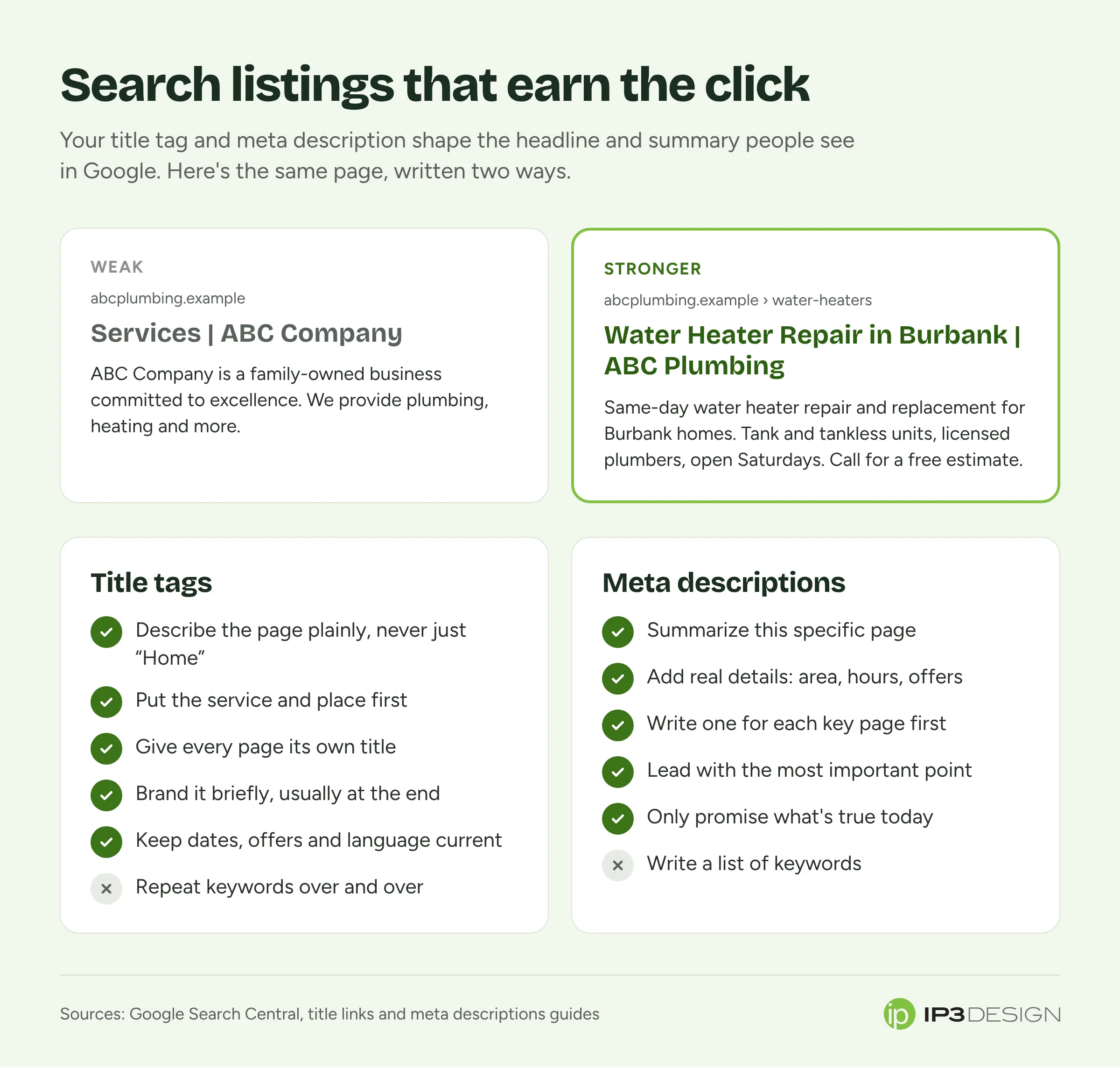
Say you run a water heater repair company in Burbank. Here’s a weak version of your service page listing:
- Title: Services | ABC Company
- Description: ABC Company is a family-owned business committed to excellence. We provide plumbing, heating and more.
Nothing here tells the searcher you fix water heaters, that you’re in Burbank, or why they should call you instead of the next result.
Here’s a stronger version:
- Title: Water Heater Repair in Burbank | ABC Plumbing
- Description: Same-day water heater repair and replacement for Burbank homes. Tank and tankless units, licensed plumbers, open Saturdays. Call for a free estimate.
The service and city come first in the title. The description adds the details a homeowner with a cold shower actually wants to know.
A one-hour plan to fix yours this week
You don’t need to rewrite your whole site at once. Here’s how we’d approach it:
- List your most important pages. Your home page, your main service pages, your contact page and any page that brings in a lot of traffic. For most small businesses, that’s a short list.
- See what Google shows today. Search for your business and your main services. Note which listings look vague, cut off or different from what you wrote.
- Check your click data. In Google Search Console, the Performance report shows impressions and clicks for each page and search. Pages that appear often but get few clicks are your best candidates. Our beginner’s guide to Search Console walks through finding them.
- Rewrite the titles. Service and location first, brand last, one clear phrase per page, and no repeats across pages.
- Rewrite the descriptions. One or two sentences that summarize the page and include a real detail or two: area, hours, offer.
- Check the page matches. Make sure the main heading on the page agrees with the new title. If the title says “Kitchen Remodeling in Pasadena” and the heading says “Welcome!”, fix the heading too.
- Wait, then look again. Google has to recrawl your pages before changes show up, so give it time. Check back in a month or so and compare clicks.
Common questions
Do title tags affect rankings?
Your title tag is the first source Google lists for building the headline of your result, and that headline is what people read before deciding to click. For a business, that’s the part that pays. A page that ranks well but gets skipped isn’t doing its job.
Do meta descriptions affect rankings?
Google’s documentation on snippets talks about descriptions as a way to inform and interest searchers. It doesn’t describe them as a ranking factor. Treat the description as ad copy for your listing, not as a place for keywords.
Why is Google showing a different title or description than the one I wrote?
Google builds both automatically and swaps in other text when it thinks that text better describes the page or fits the search. For titles, check the common issues above. For descriptions, Google may just be picking a passage from your page that suits that search.
Can I stop Google from rewriting my title?
No. Google says title links are completely automated and it can’t change them by hand for individual sites. The best you can do is follow its guidance so your title is the obvious best choice.
Want help with yours?
Titles and descriptions are a small part of SEO, but they’re the part every searcher sees. If you’d like a second set of eyes, our SEO team reviews these as part of every audit, and our local SEO work makes sure your listings speak to customers in the areas you actually serve. If your site makes these fields hard to edit, that’s often a sign it’s time to look at a new website built with SEO settings on every page.
We’ve been helping businesses get found since 2002, from our office on Brand Boulevard in Glendale. Get in touch and tell us which pages matter most to you.