Personal Injury Law Firm Google Ads: Keeping Costs Under Control

Say you run a small personal injury firm in Glendale. You’ve been running Google Ads for a few months, the monthly bill keeps creeping up, and your intake team says most of the calls are people who were never going to become clients: someone looking for a job at a law firm, a person whose accident happened in another state, a caller who wants a free answer to a traffic ticket. You know some of the spend is working. You just can’t tell which part.
That’s a very normal place to be. Personal injury is a crowded category in Los Angeles, with a lot of firms bidding on the same handful of searches, and Google Ads will happily spend whatever you give it. The firms that keep costs under control aren’t necessarily spending less. They’re refusing to pay for clicks that can’t turn into cases, and they know which clicks do.
Here’s how we approach it, in the order we’d check things on an account we just took over.
Start by deciding what a case is worth to you
Before touching a single setting, get rough answers to two questions:
- How many signed cases do you want each month, and of which types? Car accidents, trucking, slip and fall, dog bites and wrongful death are very different businesses.
- What can you afford to pay to sign one? Not per click, per signed case. You don’t need a precise figure. A range, based on what a typical case of each type brings the firm, is enough to start.
Those two answers turn “the bill feels high” into something you can measure. If the account spends a certain amount and produces a certain number of signed cases, you have a cost per case. You can compare it to what you said you could afford, and decide whether to fix, cut or grow. Without that, every budget conversation is a guess.
It also tells you where the money should go. If trucking cases are worth far more to your firm than slip and fall, give them their own campaign and budget.
Understand how Google spends your budget
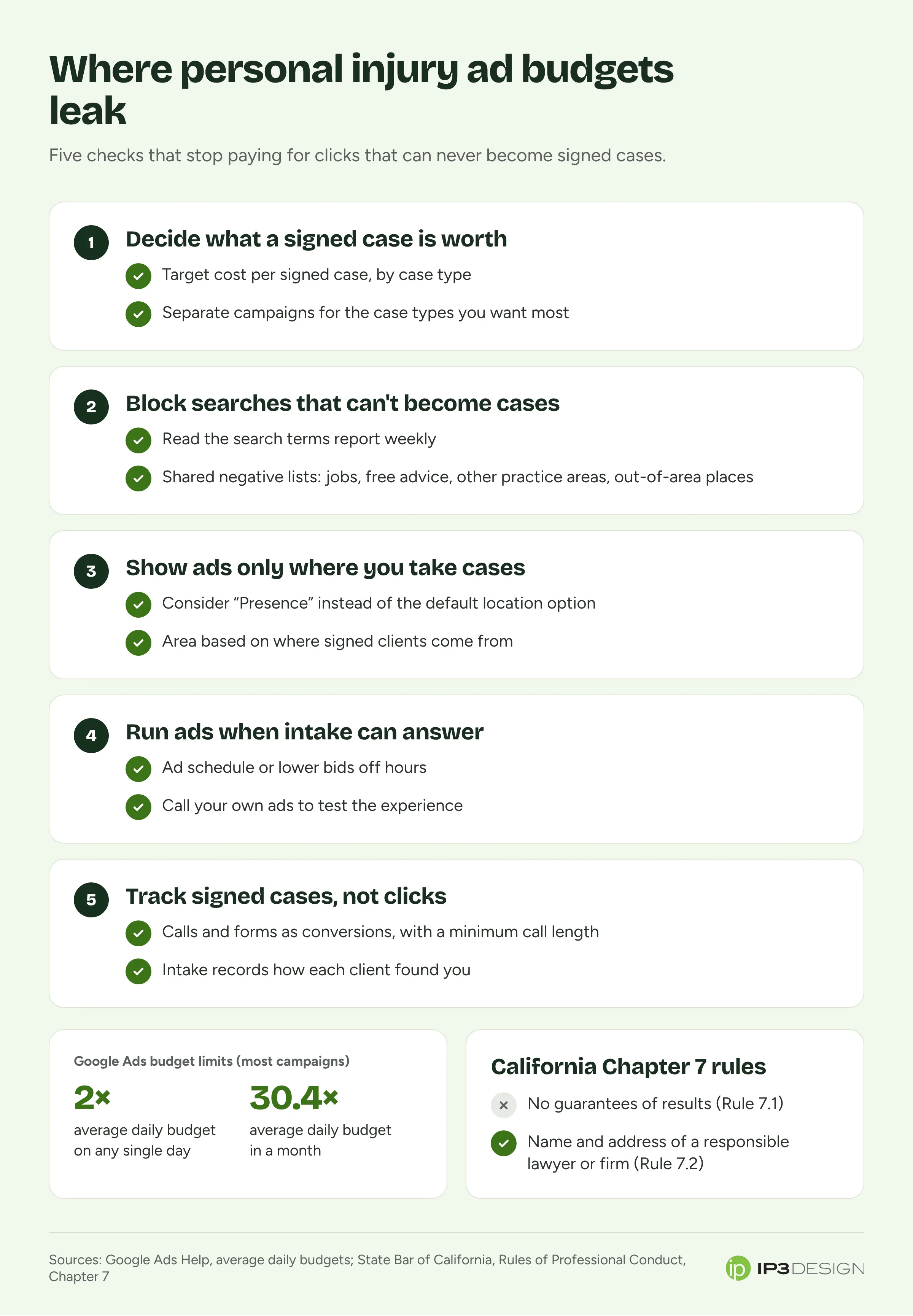
A lot of cost surprises come from misunderstanding what the daily budget actually means. Google’s help page on average daily budgets explains that most campaigns can spend up to two times the average daily budget on any particular day, and up to 30.4 times the average daily budget in a month. On some days you won’t reach the daily figure, and on others you’ll go over it.
So if you set a daily budget and then see a day where spend was close to double, nothing is broken. That’s how pacing works. Google also says you’ll never pay more than those daily and monthly limits, even if the campaign served more clicks than that.
Two practical takeaways:
- Think in monthly numbers. Multiply your daily budget by 30.4 and ask whether you’re comfortable with that as the monthly ceiling for that campaign.
- Don’t panic-edit after one expensive day. Look at the week or the month before changing budgets.
Pay only for searches that could become cases
Most wasted spend in personal injury accounts comes from searches that look related but aren’t. The words “accident” and “injury” show up in a lot of searches that have nothing to do with hiring a lawyer.
Choose keywords that show someone needs a lawyer
Searches like “car accident lawyer Glendale,” “truck accident attorney near me” or “injured in a crash who do I call” tell you someone is looking for representation. Searches like “car accident today” or “how to file an accident report” are people looking for news or paperwork. Some of those people might become clients someday, but you’ll pay for a lot of clicks to find them.
Group your keywords by case type, so each ad group holds a tight set of closely related searches with an ad and landing page written for them. That keeps the ad relevant to the search, and it lets you see which case types are costing money without producing anything.
Read the search terms report every week
Your keywords are what you bid on. The search terms are what people actually typed. Google’s search terms report shows how your ads performed when triggered by real searches, and it’s where wasted spend shows up first. Google does leave out some terms that didn’t get enough searches, so you won’t see every single one, but you’ll see the patterns.
For a new or recently changed account, we look at it weekly. You’re scanning for searches like:
- Jobs, careers, salaries and paralegal openings
- Free legal advice, forms and do-it-yourself questions
- Case types you don’t take, such as workers’ compensation or criminal defense if those aren’t your practice
- Places you don’t serve
- News searches about specific accidents
- People looking for a firm they already know by name, if that name isn’t yours
Build shared negative keyword lists
Every irrelevant search you find becomes a negative keyword, so your ads stop showing for it. Google lets you put these into negative keyword lists and apply each list to several campaigns at once. You can have up to 20 lists in an account, with up to 5,000 negative keywords per list, and when you edit a list the change applies to every campaign that shares it.
We usually keep a few lists rather than one giant one: an “always exclude” list (jobs, schools, free, forms), a list for practice areas the firm doesn’t handle, and a list of locations outside the service area. That makes it easy to see why something was blocked, and easy to remove one entry later if the firm starts taking a new case type.
Be careful not to overdo it. Blocking a word like “free” is usually fine. Blocking “insurance” may stop ads for people asking “what to do when the insurance company won’t pay,” which is exactly the person you want.
Show ads only where you can take cases
Location settings are one of the quietest sources of wasted spend.
Check the location option, not just the map
When you pick a target area, Google also asks who in relation to that area should see the ads. Google’s help pages on advanced location options describe two choices. “Presence or Interest,” the default and recommended setting, reaches people who are likely in or regularly in your area, plus people who’ve shown interest in it. “Presence” shows ads to people who are likely located, or regularly located, in the places you targeted.
Google itself says “Presence” fits when you only want to reach people in specific locations, not people elsewhere who are interested. For an injury firm, a person in another state researching “Los Angeles car accident lawyer” might be a real lead, for example if the accident happened here. More often, it’s someone who needs a lawyer where they live. We’d usually start with “Presence” and check the results after a few weeks.
Draw the area around where your cases come from
Look at where your signed clients actually live and where their accidents happened. A firm based in Glendale might take cases across Greater Los Angeles but sign most of them from a smaller set of neighborhoods and nearby cities. Start there. You can always expand once the core area is producing at a cost you’re happy with. If you want to see how we think about the metro area, our Los Angeles service area page covers the communities we focus on.
Google also notes that location targeting isn’t 100% accurate, and that people outside your area may still see ads. If a lot of traffic still comes from outside, Google suggests adding the area you serve to the ad text, so out-of-area searchers can tell the ad isn’t for them before they click.
Run ads when someone can answer the phone
By default, Google Ads campaigns show ads all day, every day. Ad scheduling lets you choose specific days and hours, and set bid adjustments to raise or lower bids at particular times.
For an injury firm, the question is simple: what happens when a potential client calls at 11 p.m. on a Saturday? If that call goes to voicemail, the person almost certainly calls the next firm on the page, and you paid for the click.
You have three reasonable options:
- Staff intake around the clock, in house or with a reliable answering service that follows your intake script. Then running ads at night can make sense.
- Limit ads to hours when a person answers. Cheaper and simpler, and you lose some late-night searchers.
- Lower bids during off hours instead of switching off entirely, then compare the results.
Whatever you choose, test it. Call your own ads at different times and see what a caller experiences.
Measure signed cases, not clicks
A low cost per click means nothing if those clicks never sign. The only number that tells you whether ads are paying off is cost per signed case, by case type.
Track calls and forms as conversions
Set up conversion tracking for calls from ads, calls from your website after an ad click, and contact form submissions. Use a minimum call length so short wrong-number calls don’t count. We cover the setup in detail in our guide to Google Ads conversion tracking for calls and form leads.
Connect leads to outcomes
Google can count calls. Only your intake team knows which calls became consultations and which became signed cases. Ask intake to record how each new caller found the firm, and once a month compare signed cases to ad spend by campaign. Even a basic spreadsheet does the job.
Once you have that, you can make real decisions: raise the budget on the campaign that signs trucking cases at a good cost, fix the landing page for the campaign that gets calls but no signings, and pause what never produces anything.
Keep your ads inside California’s advertising rules
Cost control and compliance overlap more than you’d think. An ad that overpromises might get more clicks, but it attracts the wrong callers and creates risk for the firm.
California’s Rules of Professional Conduct, Chapter 7 covers communications about a lawyer’s services, and it applies to search ads as much as to your website. A few points matter most for Google Ads:
- Rule 7.1 prohibits false or misleading communications. Its comments say an express guarantee or warranty of the result of a particular representation counts as misleading. Ad copy like “We’ll win your case” is out.
- Rule 7.2 requires advertising to include the name and address of at least one lawyer or law firm responsible for its content. Think about how your ads and landing pages meet that, for example with a location asset and the firm’s name and address on the landing page.
- Rule 7.2 also says a lawyer may pay the reasonable costs of advertisements, while restricting payment to people for recommending the lawyer’s services. If a vendor offers to sell you “exclusive leads,” have your firm’s counsel look at how that arrangement works before you sign.
- Rule 7.4 only allows you to call yourself a certified specialist if you’re currently certified by the State Bar’s Board of Legal Specialization or another accredited body, and the certifying organization is named. Keep “specialist” out of ad copy unless that’s true.
This isn’t legal advice. Have the responsible attorney review ad copy and landing pages, and keep a record of what ran.
Send clicks to a page built for that case type
The landing page decides how many of your paid clicks become calls. Sending a truck accident click to your home page wastes some of the money you just spent winning it.
A good case-type landing page has:
- A headline that matches the search, so the visitor knows they’re in the right place
- Plain answers to what the person is worried about: medical bills, the insurance company, how fees work
- How contingency fees work at your firm, stated accurately
- The attorneys who handle these cases, with real photos
- A tap-to-call button and a short form, both easy to reach on a phone
- The firm’s name and address, which also helps with Rule 7.2
Most injury searches happen on phones, often right after something bad has happened. A slow page or a buried phone number loses people fast. Our law firm SEO guide covers practice-area pages in more depth, and the same pages usually serve both your ads and your organic search.
A quick cost-control checklist
If you already run Google Ads for your firm, go through these this week:
- Do you know your target cost per signed case for each case type?
- Are case types in separate campaigns or ad groups with their own pages?
- Has someone read the search terms report in the last two weeks?
- Do you have shared negative keyword lists for jobs, free advice, other practice areas and out-of-area places?
- Is the location option set the way you intended?
- Do ads only run when someone answers, or do bids drop off hours?
- Are calls and forms tracked, with a minimum call length?
- Does intake record how each new client found you?
- Has the responsible attorney reviewed current ad copy against Chapter 7?
Common questions
How much should a personal injury firm spend on Google Ads?
Enough to get meaningful data from your highest-priority case type, and no more than you can sustain for several months. There’s no universal figure. Start with one or two campaigns, track signed cases, and grow what produces cases at a cost you’re comfortable with.
Why did Google spend more than my daily budget?
Google lets most campaigns spend up to twice the average daily budget on a single day, while keeping the month within 30.4 times the daily budget. Busy days get more, quiet days get less.
Is Google Ads better than SEO for an injury firm?
They do different jobs. Ads bring calls quickly while you pay; SEO builds up over time. Our article on Google Ads vs. SEO walks through how to decide where to put your budget first.
Where we come in
We’re a Google Partner and have been building websites and running marketing for businesses since 2002. Our PPC management for law firms focuses on exactly what’s above: tight keywords, steady negative keyword work, honest ads and tracking that ties spend to signed cases. You can see more about how we work with firms on our attorney marketing page. If your ad bill is growing faster than your caseload, get in touch and we’ll take a look at your account.